IML label artwork approval should distinguish the graphic file, the print appearance and the decorated molded part. An approved screen preview does not, by itself, establish the label’s fit, final color or behavior in the molding process. Define what each approval covers before releasing a design for production.
IML label artwork connects a packaging design to a physical label and container. A file can contain the correct logo and wording while still referring to an outdated container drawing or an unconfirmed label specification. Keep those decisions attached to the same project revision so the brand owner, label supplier, mold team and automation team are reviewing the same configuration.
Match IML Label Artwork to the Container
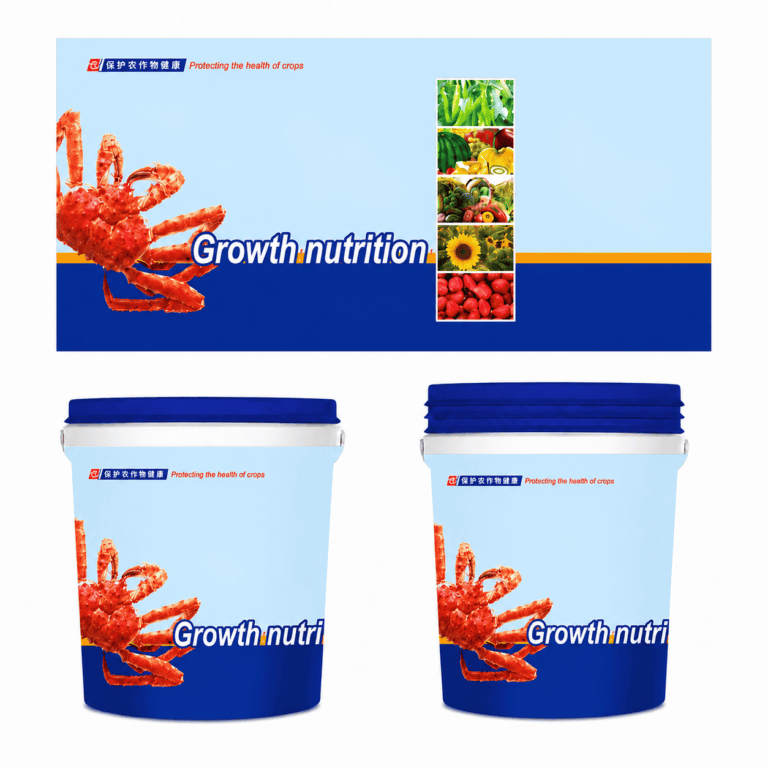
For custom IML labels, establish the container drawing or representative sample, intended decorated area and current label outline. Identify whether the proposal concerns the sidewall, lid or another agreed surface. A product photograph helps explain the appearance but does not replace dimensioned information.
Keep preliminary IML label artwork clearly marked during an initial discussion. HecosTech’s published label scope covers coordination of label dimensions, artwork requirements, mold compatibility and robot handling. The final file format, print specification, proofing route and approval responsibilities still need to be agreed for the actual project.
Confirm the Dieline Before Adapting the Graphics
The dieline is the outline used to define the label’s cut shape. Confirm its revision and source before adapting the IML label artwork. Similar-looking containers can have different decorated areas, so copying an outline from another pack does not establish a fit for the proposed mold.
Ask who supplies the approved outline and who is responsible for adapting graphics to the container’s geometry. Churchill Container’s IML artwork specifications discuss curved artwork and editable files for adapting it. This illustrates why a flat layout and a container-ready design are not always identical; its numerical specifications belong to that supplier, not HecosTech.
Resolve any outline change with the IML mold review. Keep the approved container, label and tooling references together. Do not let an artwork revision silently change a label dimension that the mold or placement tooling was designed around.
Review IML label artwork across pack sizes
For a packaging family, give each container size its own outline reference. Ask the responsible designer to check the IML label artwork against that outline instead of treating a smaller pack as a reduced copy of a larger one. Identify the intended front, back and any other viewing areas in the reference supplied for review. Compare the wording, orientation and position of important information on each proposed version.
Keep artwork review separate from dimensional approval. The design team can confirm the intended appearance, while the label and tooling teams confirm the physical references relevant to their work. An attractive visual does not resolve an uncertain container drawing. Where dimensions are still provisional, mark the affected IML label artwork as preliminary and list the information needed before release. Do not substitute an image from another packaging project for the missing drawing.
Keep IML label artwork variants identifiable
A product family may use related graphics with different product names, language versions or other content. Create a variant list that pairs each intended pack with its own file and revision. Identify which elements are common and which must be checked separately. A shared logo approval should not be taken as approval of every variant’s wording or placement.
For IML label artwork covering several variants, ask for one review record per released version or a clearly itemized combined record. Flag a missing or rejected variant without making the status of the others ambiguous. When a change is intended for the entire family, list the affected files rather than asking a supplier to infer which versions should be updated. This is a document-control recommendation, not a claim that a particular number of variants is included in a quotation.
Separate File Review From Color Approval
An IML label artwork file review can check whether the intended text, images and layout are present in the supplied revision. The label supplier should state the editable files, linked assets, fonts and reference PDF it requires. Obtain that supplier’s current instructions rather than treating a file extension as proof that the artwork is production-ready.
Color approval for IML label artwork needs an agreed reference and proofing method. Churchill Container distinguishes a digital proof from a color-approval proof. Clarify what a preview is intended to demonstrate and which physical reference, if any, will be used for acceptance. Do not judge a production color commitment solely from an ordinary screen display.
Also identify the intended label and container appearance, including any transparency or white areas that are part of the design. Ask the label supplier to explain how those requirements will be represented in the proof. No particular substrate, ink system or print finish should be treated as included until it is confirmed in the project scope.
Resolve IML label artwork comments against one reference
Consolidate feedback into a change list tied to the specific proof under review. Identify the page or view, the item to change, the requested result and the reviewer responsible for accepting it. Distinguish a correction from a question. Comments such as make it clearer or use the new version need an identifiable reference before another person can act on them consistently.
When revised IML label artwork returns, check the response to each open comment against the new reference PDF. Keep unresolved items visible. Do not assume that a revised file implements every instruction in an email thread, particularly when different reviewers supplied competing comments. Agree who resolves a conflict and who has authority to release the result. This helps the receiving supplier work from a defined decision instead of choosing between inconsistent instructions.
Assign each IML label artwork approval decision
The brand owner’s content review, the designer’s file preparation and the label supplier’s production-file checks are different responsibilities. Name the responsible party for each decision in the project record. Ask who confirms the required wording and translations, who prepares the editable package, who reviews the proof and who releases the selected version. Do not assume that a technical file check also validates a customer’s commercial statements or product information.
Where IML label artwork includes a barcode or another functional element, identify the applicable checking method and responsible party separately. A visual comparison of two PDFs is not the same as a functional verification of the finished pack. Keep the requirement open until the relevant party has agreed how it will be checked. No barcode performance, regulatory review or testing service is implied by the general artwork discussion on this page.
Review the Decoration on a Representative Molded Part
An IML label artwork proof and a decorated molded sample answer different questions. The proof concerns the agreed print reference; the molded sample lets the team review the decoration in relation to the actual container shape and intended viewing surfaces. Define the sample configuration before interpreting its result.
Record whether the sample uses the intended container material, label specification, tooling and artwork revision. If a trial uses a substitute or preliminary component, list the difference and the decision it leaves open. Do not present a sample from another container as approval of the new design.
Agree how the team will assess placement, visible edges, wording orientation and appearance on the proposed pack. Where barcode readability or other functional checks are required, assign their method and acceptance responsibility separately. A visual approval should not be described as a measured test, regulatory clearance or guarantee of every production outcome.

Check Whether the Revision Changes Label Handling
An IML label artwork revision may leave the physical label unchanged, but a new outline or label specification can raise different integration questions. Record which attributes changed instead of describing every revision simply as new artwork. The responsible team can then decide whether the existing handling assumptions still apply.
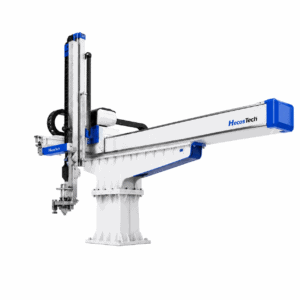
The IML automation system review should connect the agreed label with pickup, placement, mold geometry and product takeout. Request confirmation of the affected interfaces before treating a previous format’s result as applicable to the new one. This is a scope review, not an instruction to adjust operating machinery.
Keep print acceptance and equipment acceptance distinct in the project record. A label may match its artwork proof while an automation question remains unresolved, or the handling may be acceptable while the brand owner has not released the graphics. Name the open decision and responsible party in each case.
Release One Identifiable Revision
Prepare an IML label artwork release record linking the container drawing, label outline, editable artwork, reference PDF and agreed proof or sample. Include revision identifiers, the approving parties and any remaining limitations. A confirmation should identify the actual files and samples, not just say that the latest version is approved.
MCC Bingen’s artwork guidelines ask for a revised reference PDF when artwork is resupplied and describe a defined color target for proofing. These are useful examples of coordinated file and proof control, not a specification for HecosTech’s print process or an assertion of a supplier relationship.
When a later change arrives, identify which previous approvals it affects. A wording correction, color change and new cut shape need different reviews. Keep superseded files distinguishable from the released package and confirm which version is authorized before a production order is based on it.
Build an IML label artwork release package
A release package gives each reviewer a specific reference rather than an email containing several files called final. The following is a suggested project record, not a mandatory HecosTech file specification. Agree the required documents and approval responsibilities with the parties involved.
- Application reference: identify the container, decorated surface and drawing revision. State whether the reference is an approved drawing, a preliminary concept or a representative sample. Include the label outline reference so that a reviewer can see which physical configuration the graphics belong to.
- Artwork reference: record the editable file name, revision and corresponding reference PDF. Identify linked assets and the party responsible for confirming that the package meets the label supplier’s instructions. Keep working files separate from the files proposed for release.
- Review scope: state whether the approval concerns wording, layout, an agreed color reference or a molded sample. A reviewer should be able to tell what is accepted and what remains open without inferring it from a general approved message.
- Proof or sample reference: identify the actual item reviewed and its relationship to the proposed production configuration. Record any preliminary material, substituted component or other difference that limits what the review establishes.
- Decision and responsibility: identify the approving party, date, decision and outstanding actions. A supplier’s confirmation that a file is usable is different from the brand owner’s approval of its wording and appearance.
- Change control: identify the released revision and which earlier files it supersedes. Where a change affects a previous decision, obtain the relevant confirmation instead of carrying that decision forward automatically.
Example: a wording change after proof review
Consider a hypothetical IML label artwork revision that corrects wording after a proof has been reviewed. First identify the changed file and provide a matching reference PDF. Ask the responsible reviewer to confirm the corrected wording and check whether the change affects layout or another previously accepted feature. Do not describe the revised package as approved simply because the earlier version had an approval.
If the label outline, material and intended container remain unchanged, record that context without assuming that every earlier review remains valid. If the change also moves a graphic toward a label edge or alters a decorated area, identify those differences explicitly. The parties can then decide which proof or sample checks need to be repeated. This example describes a review method, not a claim about a completed HecosTech customer project.
Hand off the approved IML label artwork clearly
Before a production order is based on the package, ask the receiving party to acknowledge the exact revision and identify any missing information. Keep the approved files, related proof references and open actions together. A clear hand-off connects the commercial label requirement to the agreed technical configuration; it does not replace the supplier’s file checks or the customer’s final design approval.
Review IML label artwork before a repeat order
A repeat order should identify the released artwork revision it is based on. Compare the current order reference with the previous approved package and ask whether any relevant input has changed. These inputs may include the container drawing, label outline, supplier specification, product wording or intended appearance. A familiar product name alone is not a complete record of the configuration being ordered.
If the IML label artwork is unchanged, record that conclusion against identifiable files rather than relying on the word repeat. If something has changed, list the difference and ask the responsible parties which previous approvals remain applicable. Keep an order awaiting a decision distinguishable from an order released for production. The review should clarify responsibility; it does not establish a universal proofing requirement for every repeat job.
Include IML label artwork review in the enquiry scope
When requesting a quotation, state whether the available files are a preliminary design, an editable package awaiting checks or a previously approved revision. Identify the proof or sample review required next and the party expected to provide it. Ask the proposal to distinguish label supply, file preparation and any agreed proofing or sample work instead of assuming that all activities are included in one general label requirement.
For an IML label artwork enquiry, share the container reference, intended decorated surfaces, current outline and available file revisions. State known open decisions and who will resolve them. Keep supplier-specific file requirements attached to the proposal they belong to; one supplier’s published guidance is not automatically another supplier’s specification. A clear enquiry lets the parties discuss the actual work to be quoted without inventing a public price or a guaranteed approval schedule.
IML Label Artwork Approval Questions
Does Approving a PDF Approve the Finished Container?
Not automatically. The approval should state whether it covers file content, layout, a defined color reference or a representative molded sample. Keep unresolved physical fit, handling and acceptance questions visible rather than allowing one approval to stand for every stage.
Can Artwork Preparation Start Before the Mold Is Final?
Preliminary design work can support an early project discussion. Mark the container and label assumptions as provisional, then confirm the relevant outline, geometry and supplier requirements before release. A later tooling or label change may require another artwork review.
Discuss the Label and Container Requirements
Send the container drawing or sample, available artwork, label outline and current mold information. Identify which items are preliminary and what approval is needed next. HecosTech can discuss the label project requirements and related integration scope through email or WhatsApp.